mirror of
https://github.com/Xevion/easy7zip.git
synced 2025-12-09 08:07:19 -06:00

318 lines
14 KiB
Markdown
318 lines
14 KiB
Markdown
|
|
# README
|
|
|
|
This is the Github Page of [7-Zip] ZS with support of additional Codecs. The library used therefore is located here: [Multithreading Library](https://github.com/mcmilk/zstdmt)
|
|
|
|
You can install it in two ways:
|
|
1. complete setup with additions within the GUI and a modified Explorer context menu
|
|
2. only the codec plugin that goes to your existing [7-Zip] installation (no GUI changes and no additional Hashers)
|
|
|
|
# Status
|
|
|
|
[](https://ci.appveyor.com/project/mcmilk/7-zip-zstd)
|
|
[](https://github.com/mcmilk/7-Zip-zstd/releases)
|
|
[](https://www.paypal.me/TinoReichardt)
|
|
|
|
|
|
## Codec overview
|
|
1. [Zstandard] v1.5.4 is a real-time compression algorithm, providing high compression ratios. It offers a very wide range of compression / speed trade-off, while being backed by a very fast decoder.
|
|
- Levels: 1..22
|
|
|
|
2. [Brotli] v.1.0.9 is a generic-purpose lossless compression algorithm that compresses data using a combination of a modern variant of the LZ77 algorithm, Huffman coding and 2nd order context modeling, with a compression ratio comparable to the best currently available general-purpose compression methods. It is similar in speed with deflate but offers more dense compression.
|
|
- Levels: 0..11
|
|
|
|
3. [LZ4] v1.9.4 is lossless compression algorithm, providing compression speed at 400 MB/s per core (0.16 Bytes/cycle). It features an extremely fast decoder, with speed in multiple GB/s per core (0.71 Bytes/cycle). A high compression derivative, called LZ4_HC, is available, trading customizable CPU time for compression ratio.
|
|
- Levels: 1..12
|
|
|
|
4. [LZ5] v1.5 is a modification of LZ4 which was meant for a better ratio at cost of slower compression and decompression. It's superseded by [Lizard] now.
|
|
- Levels: 1..15
|
|
|
|
5. [Lizard] v1.0 is an efficient compressor with fast decompression. It achieves compression ratio that is comparable to zip/zlib and zstd/brotli (at low and medium compression levels) at decompression speed of 1000 MB/s and faster.
|
|
- Levels 10..19 (fastLZ4) are designed to give about 10% better decompression speed than LZ4
|
|
- Levels 20..29 (LIZv1) are designed to give better ratio than LZ4 keeping 75% decompression speed
|
|
- Levels 30..39 (fastLZ4 + Huffman) adds Huffman coding to fastLZ4
|
|
- Levels 40..49 (LIZv1 + Huffman) give the best ratio, comparable to zlib and low levels of zstd/brotli, but with a faster decompression speed
|
|
|
|
6. [Fast LZMA2] v1.0.1 is a LZMA2 compression algorithm, 20% to 100% faster than normal LZMA2 at levels 5 and above, but with a slightly lower compression ratio. It uses a parallel buffered radix matchfinder and some optimizations from Zstandard. The codec uses much less additional memory per thread than standard LZMA2.
|
|
- Levels: 1..9
|
|
|
|
## 7-Zip Zstandard Edition (full setup, with GUI and Explorer integration)
|
|
|
|
### Installation (via setup)
|
|
1. download the setup from here [7-Zip ZS Releases](https://github.com/mcmilk/7-Zip-zstd/releases)
|
|
2. install it, like the default [7-Zip]
|
|
3. use it ;)
|
|
4. you may check, if the [7-Zip] can deal with [Zstandard] or other codecs via this command: `7z.exe i`
|
|
|
|
The output should look like this:
|
|
```
|
|
7-Zip 22.01 ZS v1.5.4 R1 (x64) : Copyright (c) 1999-2022 Igor Pavlov, 2016-2022 Tino Reichardt : 2022-08-07
|
|
|
|
Libs:
|
|
0 c:\Program Files\7-Zip-Zstandard\7z.dll
|
|
1 C:\Program Files\7-Zip-Zstandard\Codecs\Iso7z.64.dll
|
|
|
|
Formats:
|
|
...
|
|
0 CK xz xz txz (.tar) FD 7 z X Z 00
|
|
0 Z z taz (.tar) 1F 9D
|
|
0 CK zstd zst tzstd (.tar) 0 x F D 2 F B 5 2 5 . . 0 x F D 2 F B 5 2 8 00
|
|
0 C F 7z 7z 7 z BC AF ' 1C
|
|
0 F Cab cab M S C F 00 00 00 00
|
|
...
|
|
|
|
Codecs:
|
|
0 4ED 303011B BCJ2
|
|
0 ED 3030103 BCJ
|
|
0 ED 3030205 PPC
|
|
0 ED 3030401 IA64
|
|
0 ED 3030501 ARM
|
|
0 ED 3030701 ARMT
|
|
0 ED 3030805 SPARC
|
|
0 ED 20302 Swap2
|
|
0 ED 20304 Swap4
|
|
0 ED 40202 BZip2
|
|
0 ED 0 Copy
|
|
0 ED 40109 Deflate64
|
|
0 ED 40108 Deflate
|
|
0 ED 3 Delta
|
|
0 ED 21 LZMA2
|
|
0 ED 30101 LZMA
|
|
0 ED 30401 PPMD
|
|
0 D 40301 Rar1
|
|
0 D 40302 Rar2
|
|
0 D 40303 Rar3
|
|
0 D 40305 Rar5
|
|
0 ED 4F71102 BROTLI
|
|
0 ED 4F71104 LZ4
|
|
0 ED 4F71106 LIZARD
|
|
0 ED 4F71105 LZ5
|
|
0 ED 4F71101 ZSTD
|
|
0 ED 21 FLZMA2
|
|
0 ED 6F10701 7zAES
|
|
0 ED 6F00181 AES256CBC
|
|
1 3ED 4F712FF RawSplitter
|
|
|
|
Hashers:
|
|
0 32 20A BLAKE3
|
|
0 4 1 CRC32
|
|
0 16 205 MD2
|
|
0 16 206 MD4
|
|
0 16 207 MD5
|
|
0 20 201 SHA1
|
|
0 32 A SHA256
|
|
0 48 208 SHA384
|
|
0 64 209 SHA512
|
|
0 4 203 XXH32
|
|
0 8 204 XXH64
|
|
0 8 4 CRC64
|
|
0 32 202 BLAKE2sp
|
|
```
|
|
|
|
### Usage and features of the full installation
|
|
|
|
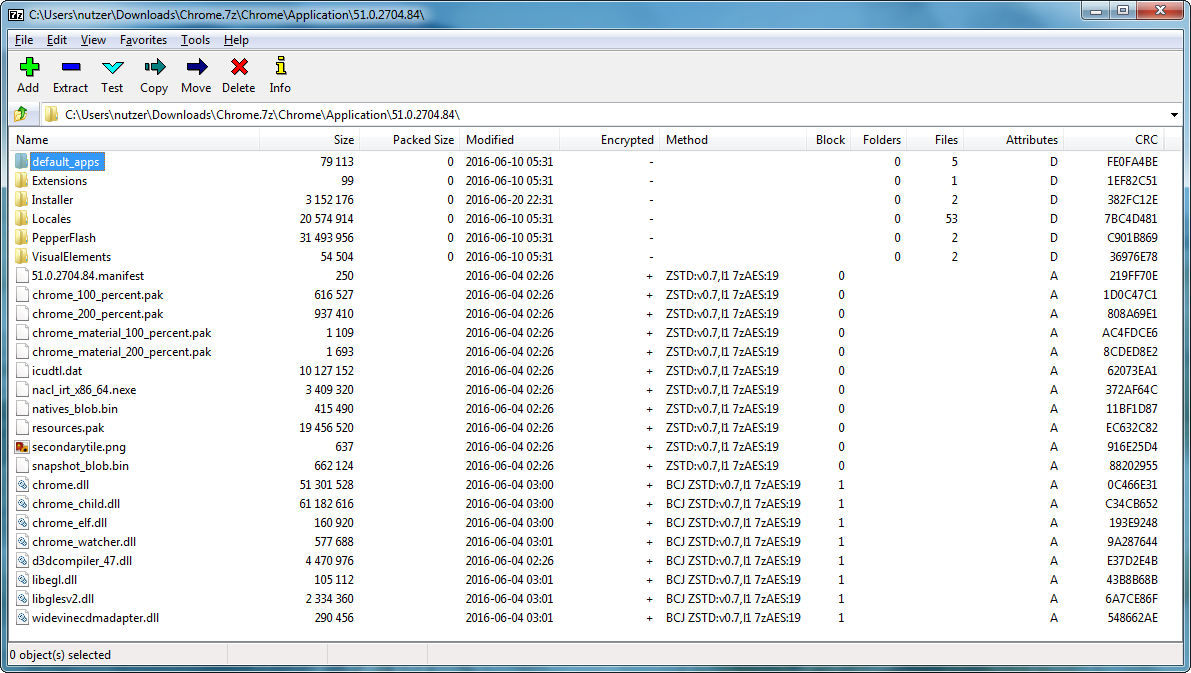
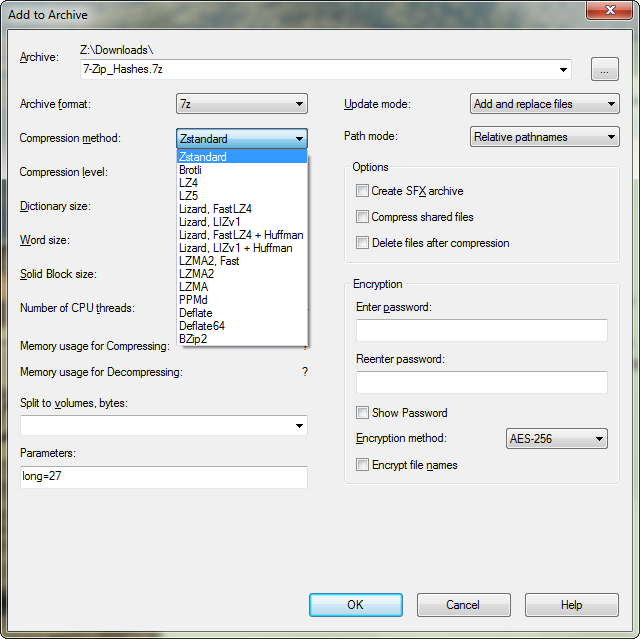
- compression and decompression for [Brotli], [Lizard], [LZ4], [LZ5] and [Zstandard] within the [7-Zip] container format
|
|
- compression and decompression of [Lizard] (`.liz`), [LZ4] (`.lz4`), [LZ5] (`.lz5`) and [Zstandard] (`.zstd`) files
|
|
- handling of ZIP files with [Zstandard] compression
|
|
- included [lzip] decompression support, patch from: https://download.savannah.gnu.org/releases/lzip/7zip/
|
|
- explorer context menu: _"Add to xy.7z"_ will use all parameters of the last "Add to Archive" compression dialog (this includes: method, level, dictionary, blocksize, threads and paramters input box)
|
|
- squashfs files with LZ4 or Zstandard compression can be handled
|
|
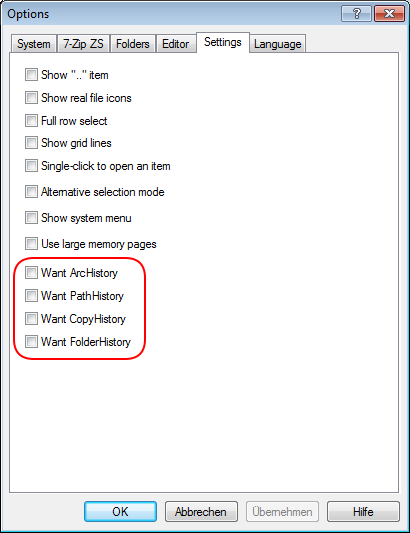
- several history settings aren't stored by default, look [here](https://sourceforge.net/p/sevenzip/discussion/45797/thread/dc2ac53d/?limit=25) for some info about that, you can restore original 7-Zip behavior via `tools->options->settings`
|
|
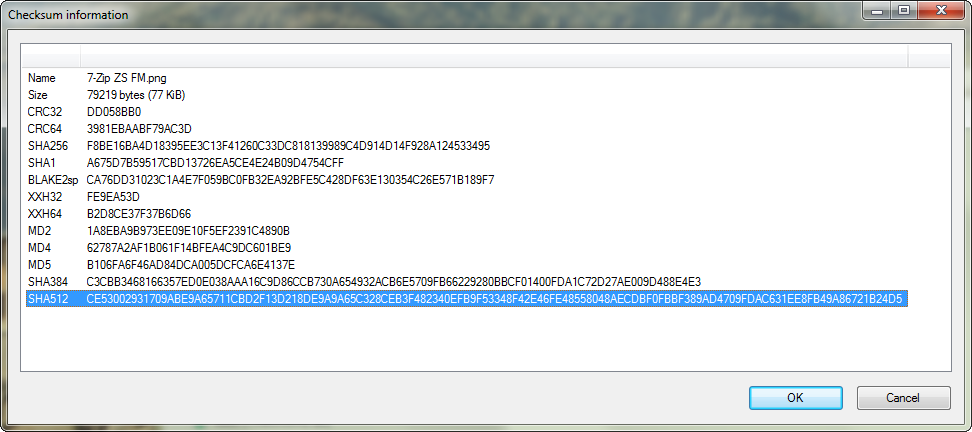
- these hashes can be calculated: CRC32, CRC64, MD2, MD4, MD5, SHA1, SHA256, SHA384, SHA512, XXH32, XXH64, BLAKE2sp, BLAKE3 (lowercase or uppercase)
|
|
|
|
```
|
|
7z a archiv.7z -m0=zstd -mx0 Zstandard Fastest Mode, without BCJ preprocessor
|
|
7z a archiv.7z -m0=zstd -mx1 Zstandard Fast mode, with BCJ preprocessor on executables
|
|
7z a archiv.7z -m0=zstd -mx.. ...
|
|
7z a archiv.7z -m0=zstd -mx21 Zstandard 2nd Slowest Mode, with BCJ preprocessor on executables
|
|
7z a archiv.7z -m0=zstd -mx22 Zstandard Ultra Mode, with BCJ preprocessor on executables
|
|
|
|
7z a archiv.7z -m0=lz4 -mx0 LZ4 Fastest Mode, without BCJ preprocessor
|
|
7z a archiv.7z -m0=lz4 -mx1 LZ4 Fast mode, with BCJ preprocessor on executables
|
|
7z a archiv.7z -m0=lz4 -mx.. ...
|
|
7z a archiv.7z -m0=lz4 -mx12 LZ4 Ultra Mode, with BCJ preprocessor on executables
|
|
|
|
7z a archiv.7z -m0=lz5 -mx0 LZ5 Version 1.5 Fastest Mode, without BCJ preprocessor
|
|
7z a archiv.7z -m0=lz5 -mx1 LZ5 Version 1.5 Fast mode, with BCJ preprocessor on executables
|
|
7z a archiv.7z -m0=lz5 -mx.. ...
|
|
7z a archiv.7z -m0=lz5 -mx16 LZ5 Version 1.5 Ultra Mode, with BCJ preprocessor on executables
|
|
|
|
7z a archiv.7z -m0=flzma2 -mx1 Fast LZMA2 Fastest mode, with BCJ preprocessor on executables
|
|
7z a archiv.7z -m0=flzma2 -mx.. ...
|
|
7z a archiv.7z -m0=flzma2 -mx9 Fast LZMA2 Ultra Mode, with BCJ preprocessor on executables
|
|
|
|
7z x -so test.tar.zstd | 7z l -si -ttar
|
|
-> show contents of zstd compressed tar archiv test.tar.zstd
|
|
|
|
7z x -so test.tar.lz | 7z l -si -ttar
|
|
-> show contents of lzip compressed tar archiv test.tar.lz
|
|
```
|
|
|
|

|
|
|
|
|
|
|
|
|
|
|
|
## Zstandard codec Plugin for Mainline 7-Zip
|
|
|
|
### Installation (via plugin)
|
|
|
|
1. download the `Codecs.7z` archiv from here [7-Zip ZS Releases](https://github.com/mcmilk/7-Zip-zstd/releases), this archive holds binaries, which are compatible with the Mainline version of [7-Zip]
|
|
2. create a new directory named `Codecs` and put in there the zstd-x32.dll or the zstd-x64.dll, depending on your [7-Zip] installation
|
|
- normally, the x32 should go to: "C:\Program Files (x86)\7-Zip\Codecs"
|
|
- the x64 version should go in here: "C:\Program Files\7-Zip\Codecs"
|
|
3. you could also replace the `7z.dll` directly within `C:\Program Files (x86)\7-Zip`
|
|
4. then you may check if the dll is correctly installed via this command: `7z.exe i`
|
|
|
|
The output should look like this:
|
|
```
|
|
7-Zip 21.03 (x64) : Copyright (c) 1999-2021 Igor Pavlov : 2021-05-06
|
|
|
|
Libs:
|
|
0 C:\Program Files\7-Zip\7z.dll
|
|
|
|
Libs:
|
|
0 c:\Program Files\7-Zip\7z.dll
|
|
1 c:\Program Files\7-Zip\Codecs\brotli-x64.dll
|
|
2 c:\Program Files\7-Zip\Codecs\flzma2-x64.dll
|
|
3 c:\Program Files\7-Zip\Codecs\lizard-x64.dll
|
|
4 c:\Program Files\7-Zip\Codecs\lz4-x64.dll
|
|
5 c:\Program Files\7-Zip\Codecs\lz5-x64.dll
|
|
6 c:\Program Files\7-Zip\Codecs\zstd-x64.dll
|
|
|
|
...
|
|
|
|
Codecs:
|
|
0 4ED 303011B BCJ2
|
|
0 ED 3030103 BCJ
|
|
0 ED 3030205 PPC
|
|
0 ED 3030401 IA64
|
|
0 ED 3030501 ARM
|
|
0 ED 3030701 ARMT
|
|
0 ED 3030805 SPARC
|
|
0 ED 20302 Swap2
|
|
0 ED 20304 Swap4
|
|
0 ED 40202 BZip2
|
|
0 ED 0 Copy
|
|
0 ED 40109 Deflate64
|
|
0 ED 40108 Deflate
|
|
0 ED 3 Delta
|
|
0 ED 21 LZMA2
|
|
0 ED 30101 LZMA
|
|
0 ED 30401 PPMD
|
|
0 D 40301 Rar1
|
|
0 D 40302 Rar2
|
|
0 D 40303 Rar3
|
|
0 D 40305 Rar5
|
|
0 ED 6F10701 7zAES
|
|
0 ED 6F00181 AES256CBC
|
|
1 ED 4F71102 BROTLI
|
|
2 ED 21 FLZMA2
|
|
3 ED 4F71106 LIZARD
|
|
4 ED 4F71104 LZ4
|
|
5 ED 4F71105 LZ5
|
|
6 ED 4F71101 ZSTD
|
|
```
|
|
|
|
### Usage (codec plugin)
|
|
|
|
- compression and decompression for [Brotli], [Fast LZMA2], [Lizard], [LZ4], [LZ5] and [Zstandard] within the 7-Zip container format
|
|
- you can only create `.7z` files, the files like `.lz4`, `.lz5` and `.zstd` are not covered by the plugins
|
|
- when compressing binaries (*.exe, *.dll), you have to explicitly disable the bcj2 filter via `-m0=bcj`,
|
|
when using only the plugin dll's
|
|
- so the usage should look like this:
|
|
```
|
|
7z a archiv.7z -m0=bcj -m1=zstd -mx1 Fast mode, with BCJ preprocessor on executables
|
|
7z a archiv.7z -m0=bcj -m1=zstd -mx.. ...
|
|
7z a archiv.7z -m0=bcj -m1=zstd -mx21 2nd Slowest Mode, with BCJ preprocessor on executables
|
|
7z a archiv.7z -m0=bcj -m1=zstd -mx22 Ultra Mode, with BCJ preprocessor on executables
|
|
7z a archiv.7z -m0=bcj -m1=brotli -mxN ...
|
|
7z a archiv.7z -m0=bcj -m1=lizard -mxN ...
|
|
7z a archiv.7z -m0=bcj -m1=lz4 -mxN ...
|
|
7z a archiv.7z -m0=bcj -m1=lz5 -mxN ...
|
|
7z a archiv.7z -m0=bcj -m1=flzma2 -mxN ...
|
|
```
|
|
|
|
## Codec Plugin for Total Commander
|
|
- download [TotalCmd.7z]
|
|
- install it, by replacing the files `tc7z.dll` and `tc7z64.dll` with the new ones
|
|
- you can check the Total Commander Forum for more information about this [DLL Files](https://ghisler.ch/board/viewtopic.php?p=319216)
|
|
- decompression for [Brotli], [Lizard], [LZ4], [LZ5] and [Zstandard] ot the 7-Zip `.7z` format
|
|
will work out of the box with Total Commander now :-)
|
|
|
|
## Codec Plugin for Far Manager
|
|
- copy the `7z.dll` file from `C:\Program Files\7-Zip-Zstandard\7z.dll` to `C:\Program Files\Far Manager\Plugins\ArcLite\7z.dll`
|
|
- then restart the Far manager - and on next start, you will have support for 7-Zip Zstandard archives ;-)
|
|
|
|
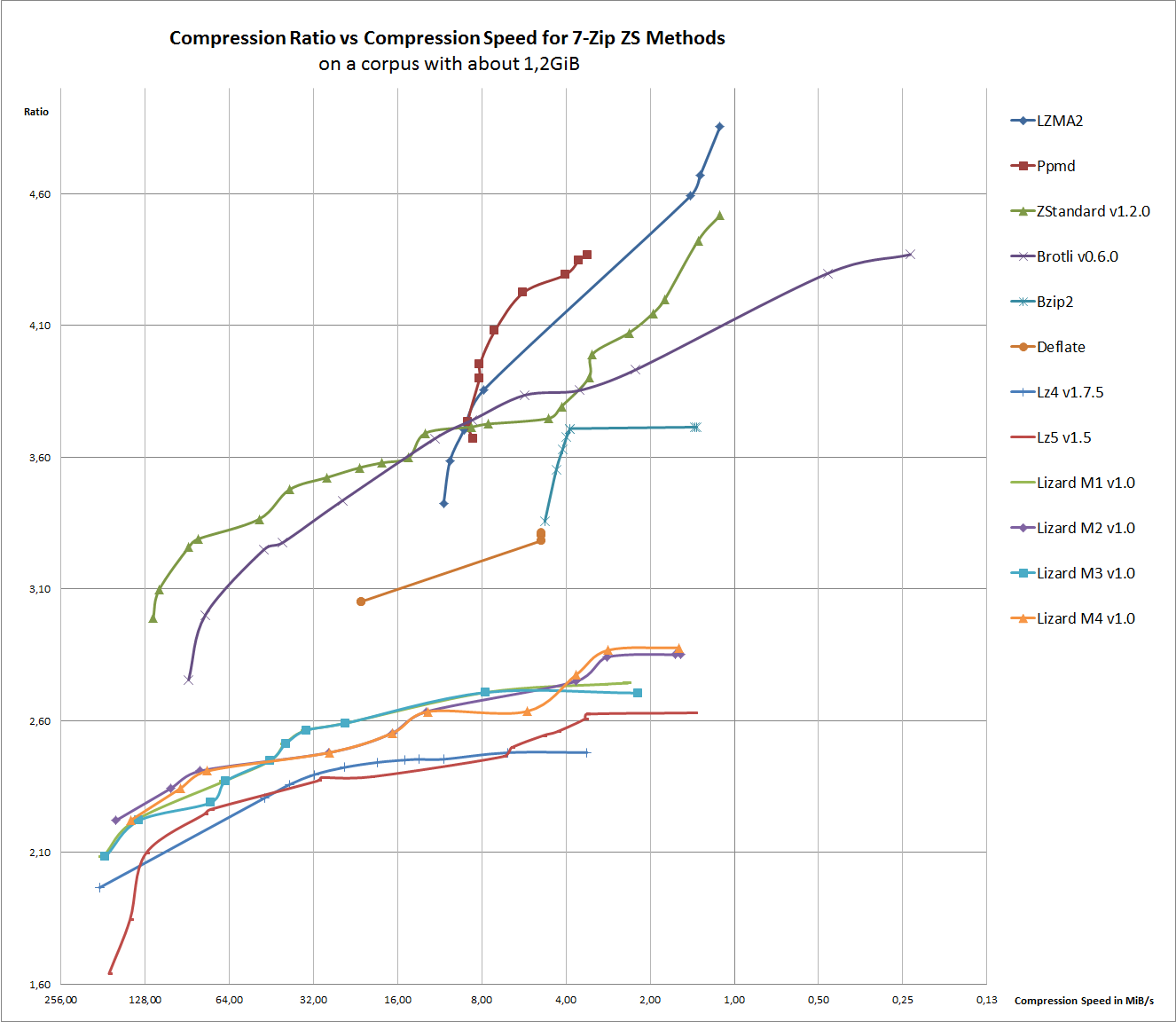
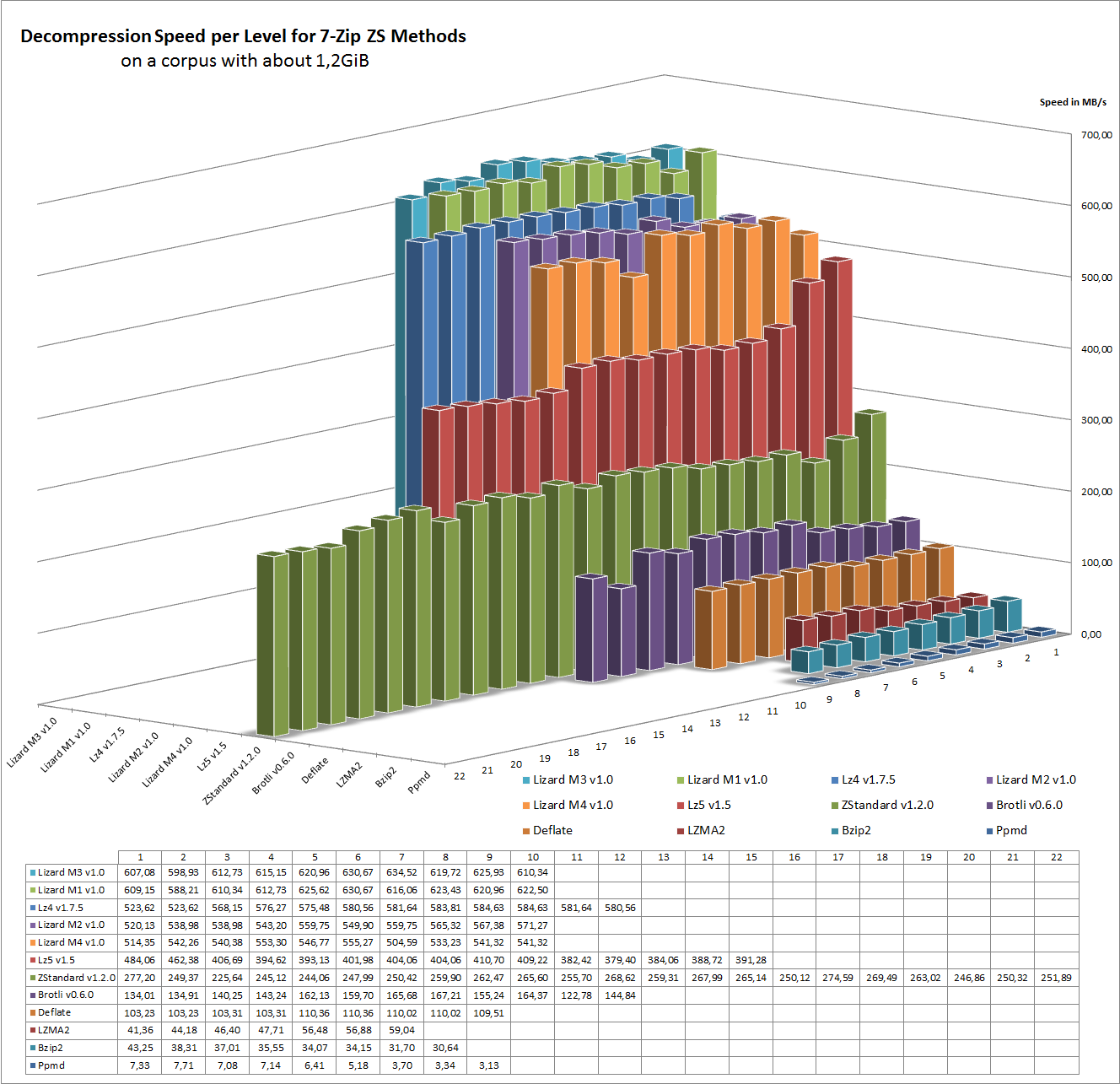
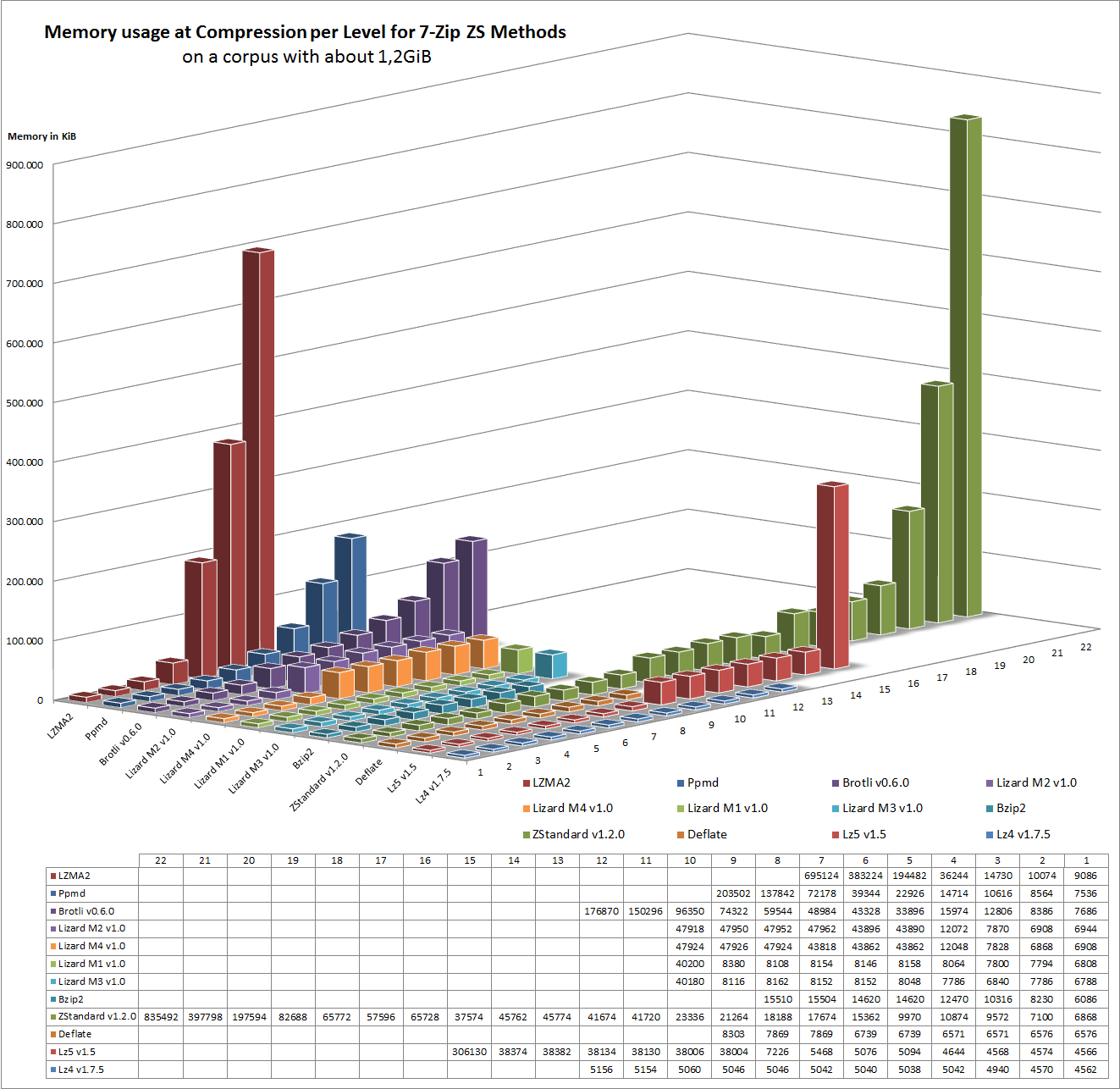
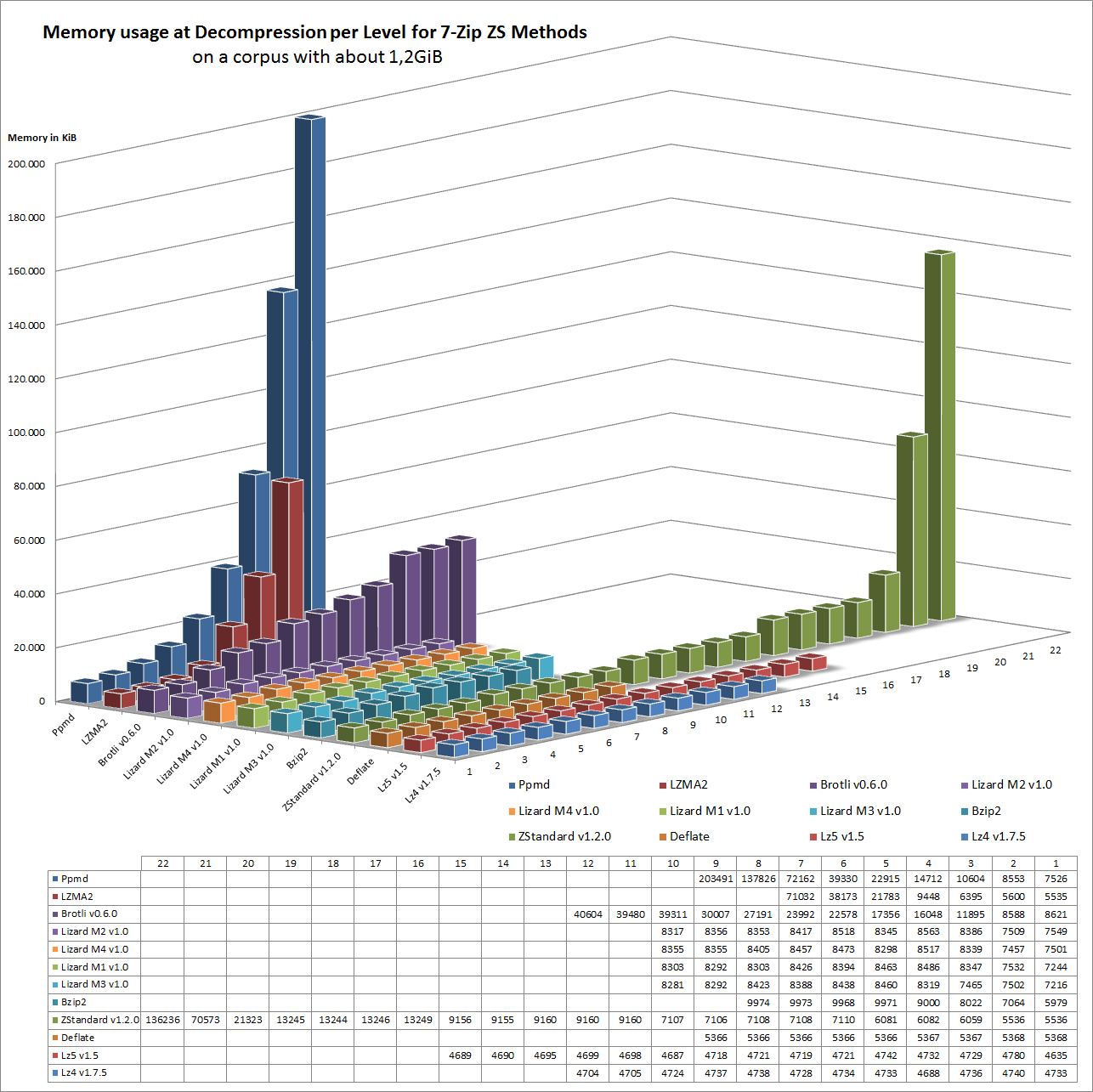
## Benchmarks
|
|
|
|
For the benchmarks I am using Windows 7 64bit on my Laptop which has the following Hardware:
|
|
- Intel i7-3632QM, limited to 2,2GHz, 16GB RAM, disabled swap space
|
|
- the compression benchmark is read / written to an 4 GiB [ImDisk]
|
|
- the decompression benchmark is also done in RAM via: `7z t archiv.7z`
|
|
- the tool for measuring the times is [wtime](https://github.com/mcmilk/wtime), together with some [scripts](https://github.com/mcmilk/7-Zip-Benchmarking)
|
|
- the testfile is generated via [generate-mcorpus](https://github.com/mcmilk/7-Zip-Benchmarking/blob/master/generate-mcorpus)
|
|
- please note, that the benchmarks are outdated now (new one will come, but it needs some time)
|
|
|
|
|
|
|
|
|
|
|
|
|
|
|
|
## Themes
|
|
|
|
- FileManager Toolbar Icon Theme: Glyfz 2016 by AlexGal [homepage](https://www.deviantart.com/alexgal23)
|
|
- File Types Icon Theme: Windows 10 by masamunecyrus [homepage](https://www.deviantart.com/masamunecyrus)
|
|
- Additional icons file types created by Mr4Mike4 [homepage](https://github.com/Mr4Mike4)
|
|
|
|
## License and Redistribution
|
|
|
|
- The same as the Mainline [7-Zip], which means most of the code is GNU LGPL v2.1-or-later
|
|
- Read [COPYING](COPYING) for more details
|
|
|
|
## Links
|
|
|
|
- [7-Zip Homepage](https://www.7-zip.org/)
|
|
- [7-Zip Zstandard Homepage](https://mcmilk.de/projects/7-Zip-zstd/)
|
|
- [Request for inclusion](https://sourceforge.net/p/sevenzip/discussion/45797/thread/a7e4f3f3/) into the mainline 7-Zip:
|
|
- result, will currently not included :(
|
|
- [p7zip Homepage](https://github.com/jinfeihan57/p7zip) - for Linux and MacOS with LZ4 and Zstandard
|
|
|
|
## Donate
|
|
|
|
You find this project useful, maybe you consider a donation ;-)
|
|
|
|
[](https://www.paypal.me/TinoReichardt)
|
|
|
|
## Version Information
|
|
|
|
- 7-Zip ZS Version 22.01
|
|
- [Brotli] Version 1.0.9
|
|
- [Fast LZMA2] Version 1.0.1
|
|
- [Lizard] Version 1.0
|
|
- [LZ4] Version 1.9.4
|
|
- [LZ5] Version 1.5
|
|
- [Zstandard] Version 1.5.4
|
|
- [BLAKE3] Version 0.3.7
|
|
|
|
/TR 2023-02-21
|
|
|
|
## Notes
|
|
|
|
- if you want an code signed installer, you need to donate sth.
|
|
|
|
[7-Zip]:https://www.7-zip.org/
|
|
[lzip]:https://www.nongnu.org/lzip/
|
|
[Brotli]:https://github.com/google/brotli/
|
|
[BLAKE3]:https://github.com/BLAKE3-team/BLAKE3
|
|
[LZ4]:https://github.com/lz4/lz4/
|
|
[LZ5]:https://github.com/inikep/lz5/
|
|
[Zstandard]:https://github.com/facebook/zstd/
|
|
[Lizard]:https://github.com/inikep/lizard/
|
|
[ImDisk]:https://sourceforge.net/projects/imdisk-toolkit/
|
|
[Fast LZMA2]:https://github.com/conor42/fast-lzma2
|
|
[Codecs.7z]:https://github.com/mcmilk/7-Zip-zstd/releases
|
|
[TotalCmd.7z]:https://github.com/mcmilk/7-Zip-zstd/releases
|